Real-Time Reference Monitoring

Your mix.
On every device.
Right now.

Stream your DAW mix in real-time to your iPhone and Bluetooth devices for faster and more accurate mixing — instantly, without bouncing files.

Get MixRef — $39 Learn More
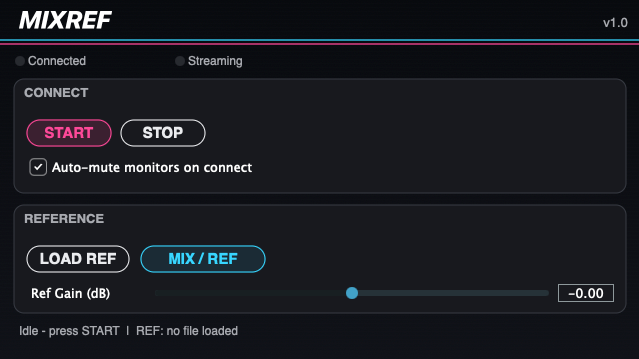
MixRef Plugin

MixRef Plugin  ·  AU / VST3 / AAX

Why Producers and Engineers Love MixRef

🎧

Hear Your Mix the Way Everyone Else Will

Listen on your iPhone, AirPods, and Bluetooth speakers — in real-time, directly from your DAW. No more guessing how your mix translates.

⚡

Mix Faster. Skip the Bounce.

Get instant feedback without ever stopping your session. Hear a change the moment you make it.

🎵

A/B Reference Commercial Tracks in Seconds

Load any reference track into MixRef and flip between it and your mix with a single click. Hear exactly where you need to go.

💰

One-Time Purchase. Yours Forever.

$39. No monthly fees, no subscriptions, no surprises. Buy it once and own it.

Up and Running in Seconds

1

Insert MixRef

Drop MixRef on your mix bus in any compatible DAW.

2

Press START

MixRef broadcasts your mix live over Wi-Fi.

3

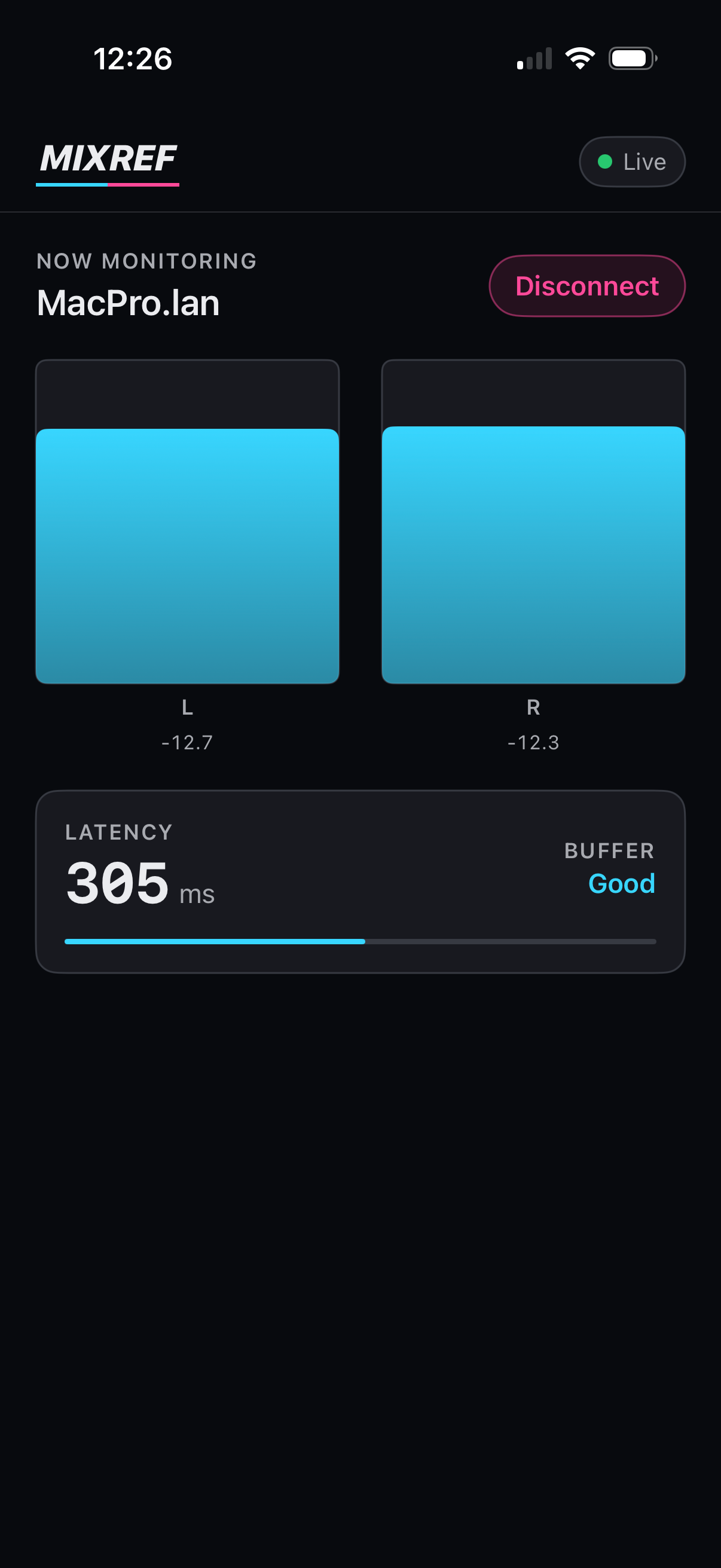
Open the App

Launch MixRef Receiver on your iPhone — select your computer to connect.

4

Listen & Mix

Hear exactly what your audience hears, in real time.

Watch the Demo

See how MixRef streams your DAW mix in real-time to your iPhone.

Good to Know

Does MixRef work with my DAW?

MixRef works as an AU plugin (Logic Pro, Digital Performer, GarageBand), VST3 (Ableton Live, Studio One, Reaper, Cubase, and more), and AAX (Pro Tools). All formats are included in a single installer.

Which iOS versions are supported?

The MixRef Receiver app requires iOS 16 or later. iOS 17 or newer is recommended for the best experience.

Do I need a Wi-Fi network?

Yes — your Mac and iPhone need to be on the same Wi-Fi network. A 5GHz network is recommended for best performance. Note that Wi-Fi streaming will always introduce a small amount of latency — MixRef is fully optimized to keep this as low as possible, but it's not a zero-latency connection. The stronger your signal, the smoother the experience.

Does it work with Bluetooth speakers and AirPods?

Absolutely. Once the audio is on your iPhone via the MixRef Receiver app, you can route it to any Bluetooth device connected to your iPhone — AirPods, speakers, and more.

Is there a free trial?

Not currently. With a one-time price of $39 and no subscription, there's very little risk.

Do I need an account to use MixRef?

No account needed for the plugin. MixRef Receiver is a free download on the App Store.

What macOS versions are supported?

MixRef requires macOS 12 Monterey or later. macOS 14 Sonoma or newer is recommended for the best experience.
Zach Klein

"MixRef allows me to instantly pinpoint resonant frequencies in real-time, and it has been a game changer for making my piano sound good through an iPhone! It's so easy to find a pleasing balance quickly with MixRef."

— Zach Klein, Independent Producer & Mixing Engineer

What You Need

Mac — Plugin

  • macOS 12 Monterey or later
  • macOS 14 Sonoma+ recommended
  • Apple Silicon or Intel (Universal Binary)
  • AU, VST3, or AAX compatible DAW (Logic, Digital Performer, Ableton, Pro Tools, and more)
  • Wi-Fi network

iPhone — Companion App

DAW Compatibility

Logic Pro Digital Performer Ableton Live Studio One Reaper Cubase GarageBand Pro Tools

Own It for Life.

One-time payment

$39

+ applicable tax

  • MixRef AU + VST3 + AAX plugin (Mac, Universal Binary)
  • MixRef Receiver iOS app (free on the App Store)
  • Free updates
  • Up to 2 personal computers
Buy Now — $39

Secure checkout powered by LemonSqueezy.
All major cards accepted.

Download the FREE MixRef Receiver iOS companion app.

Download on the App Store

Critical Updates Only.

Never spammy! Sign up only if you want to know when something important changes: a major update, a new platform, or a fix that affects you.

No spam. Unsubscribe any time.